A pharmacy inventory workbook your facility can actually use
Most pharmacy management software was designed for retail pharmacies in cities with stable electricity, dedicated IT staff, and monthly subscriptions of 30,000–180,000 FCFA.
None of those conditions hold in the average African district health facility.
So I built a different kind of tool.
What this is
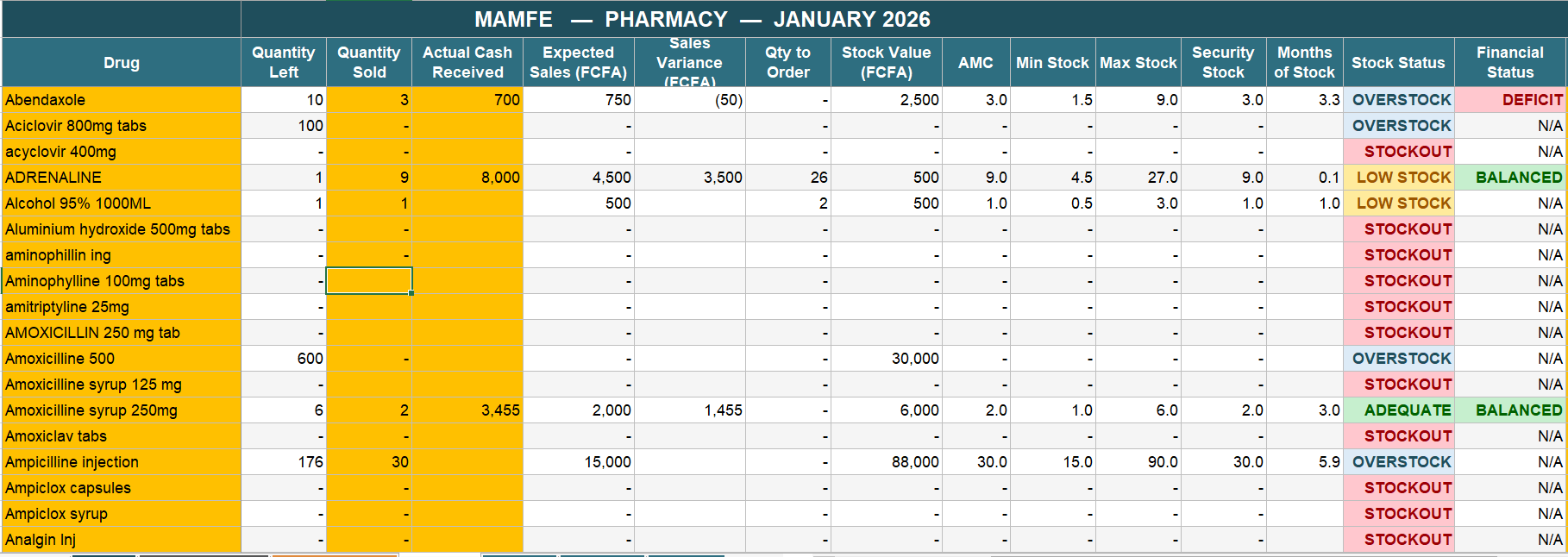
A complete pharmacy inventory management workbook for a single health facility. One Excel file. 18 sheets. 245 drugs pre-loaded with another 55 free slots. No internet. No installation. No subscription. No vendor lock-in.
It tracks every drug across all 12 months of the year, computes Average Monthly Consumption using a 3-month rolling average (the WHO standard), and automatically calculates Minimum Stock, Maximum Stock, Security Stock, and Quantity to Order. Every drug is colour-coded as STOCKOUT / LOW STOCK / ADEQUATE / OVERSTOCK. Every batch is tracked with its expiry date using FEFO (First Expiry First Out) discipline.
Why it beats traditional pharmacy apps
Cost. Traditional pharmacy software charges every month, every facility, forever. This workbook is free in the Free Library. After download, it is yours.
Offline. Most pharmacy SaaS tools assume always-on internet. This workbook is a file. It opens. It works whether the generator is running or not.
Transparent. Every calculation is a visible Excel formula. If the Director asks why a drug is flagged for reorder, the pharmacist can click the cell and show the math. No black boxes. No vendor lock-in.
Survives anything. No licence server to phone home. No cloud sync to break. No “enable editing” dialog that requires admin rights. It runs in Excel, LibreOffice, WPS, Google Sheets, and mobile spreadsheet apps.
What is in the package
- FieldHealth_Pharmacy_Inventory_v2.1.xlsx — the workbook itself
- 24-page user guide — setup, monthly routine, adding new drugs, sorting, batch tracking, troubleshooting, and the full v2.0 → v2.1 changelog
How to use it
- Download both files from the Free Library below.
- Open the workbook. Go to the Cover sheet. Type your facility name in the orange cell.
- Open JAN_26. Review the pre-loaded drug list. Adjust prices or add your own drugs if needed.
- Each month, fill in three columns: Stock Received, Quantity Sold, Cash Received. The workbook handles everything else.
- Open the DASHBOARD sheet at month-end. Print it for review meetings.
Who this is for
DMOs, facility managers, district pharmacists, M&E officers, and anyone responsible for keeping a pharmacy stocked in a low-resource setting.
If that is you, the files are below. Use them. Share them. Tell me what breaks.
[ STAY_CONNECTED ]
New tools. Field notes. No noise.
Get notified when new tools launch and read dispatches from the district — straight from Mamfe to your inbox.

Dr. Nzozone Henry Fomukong
MD · Field Epidemiologist · DMO, Mamfe